Active Data Guard is a configuration option that became available in Oracle 11g where a standby database is maintained as a synchronised physical replica of the primary database and is also open for read-only SQL queries.
PeopleSoft added configuration to direct certain read-only components and processes to an ADG standby using secondary connections in the application servers and process schedulers. However, in PeopleSoft, all scheduled processes update at least the process scheduler request tables, even if they make no updates to application tables. This cannot be done on a read-only standby database and must be directed back to the primary database.
PeopleBooks sets out a method for Implementing Active Data Guard (this link is to the PeopleTools 8.58 documentation). It uses a second schema to which PeopleSoft application servers and process schedulers connect using a second access profile. The second schema contains synonyms for each table and view that either point to the corresponding object in the original schema on the ADG standby, or if the object is going to be updated by the application then via database links to the corresponding object in the primary database. This approach requires knowledge of which tables are updated during otherwise read-only processing, a lot of scripting to generate all the synonyms and grants, and ongoing maintenances as new objects are added to the database.
However, that approach is rendered obsolete by Active Data Guard DML redirection, a new feature in 19c. This post explains how to configure PeopleSoft to make use of Active Data Guard on Oracle 19c with DML redirect.
With DML redirection enabled, updates on the secondary database are automatically redirected back to the primary database via a SQL*Net connection between the databases (not unlike a database link), and then they will be replicated back to the standby database like any other change. PeopleSoft no longer needs to be configured specially to handle updated tables differently. Consequently, the PeopleSoft ADG configuration is massively simplified.
Processes no longer have to be strictly read-only to run on the ADG database. If there are only a small quantity of updates the redirect can handle it.
Database Initialisation Parameters
The parameter ADG_REDIRECT_DML should be set to true on both the primary and active data guard standby databases.
PeopleSoft Connection Configuration
A second row must be added to PS.PSDBOWNER to map the TNS name of the standby database to the database owner ID, in this case SYSADM.
SQL>select * from ps.psdbowner;

DBNAME   OWNERID
-------- --------
FINPRD   SYSADM
FINADG   SYSADM
Application Server Configuration
To facilitate read-only components in the PIA (such as the query manager) redirecting to the standby database, all Application Server domains should still be configured to connect to both the primary database and the standby database, as described in the PeopleSoft documentation
[Startup]
;=========================================================================
; Database Signon settings
;=========================================================================
DBName=FINPRD
DBType=ORACLE
UserId=PSAPPS
UserPswd={V2}FEhk7rIFt2f0GRYaH6B9la8DXXMNtsz1kPZ+
ConnectId=PEOPLE
ConnectPswd={V2}Mw3RFr0MHFBpJHbqXh7Dx9qCsO7TFT4G
StandbyDBName=FINADG
StandbyDBType=ORACLE
StandbyUserId=PSAPPS
StandbyUserPswd={V2}Ski/r2xYCvbTbBhXOGfH8HO7zCRxoDFK5rmb
Process Scheduler Configuration
The approach for Process Schedulers is slightly different.
Application Engine Limitation in Active Data Guard
It is a documented limitation of Application Engine that only PSAESRV Application Engine server processes can connect via the second connection to the standby database. If a standalone PSAE process attempts this the connection will fail.
See:
- Oracle Support Note: E-AE: Application Engine Process Might Stay in Initiated Status if PSAESRV Disabled on PeopleSoft ADG Enabled Environment (Doc ID 1641764.1)
- This was raised as Bug 18482301: PSAE may stay in initiated status on ADG configured environment. It was closed as 'not a bug'.
- Using Two Temporary Tablespace in PeopleSoft.
Error in sign on
 Database Type: 7 (ORACLE)
 Database Name: HCM91
 Server Name:
 OperID:
 ConnectID: people
 Process Instance: 0
 Reason: Invalid user ID or password for database signon. (id=)
 Note: Attempt to authenticate using GUID 6a1ced41-2fe0-11e2-9183-be3e31d6e740
Invalid command line argument list.
 process command line: -CT ORACLE -CD HCM91 -GUID 6a1ced41-2fe0-11e2-9183-be3e31d6e740 -SS NO -SN NO
 GUID command line : -CT ORACLE -CD HCM91 -CO "PS" -CP Unavailable -R 1 -I 852 -AI AEMINITEST -OT 6 -FP
"C:\app\pt\appserv\prcs\HCM91PSNT\log_output\AE_AEMINITEST_852\" -OF 1
To continue to use stand-alone PSAE processes, as recommended in the PeopleTools Performance Guidelines Red Paper (Doc ID:
747389.1), it is necessary to configure separate process schedulers that connect only to the Active Data Guard standby database, and processes will need to be redirected appropriately by process categories to these schedulers.
System Settings
Process Categories can be used to restrict certain processes to certain processes schedulers. In the Process Scheduler System Settings component, create a new category ADGOnly.
New Process Schedulers for ADG
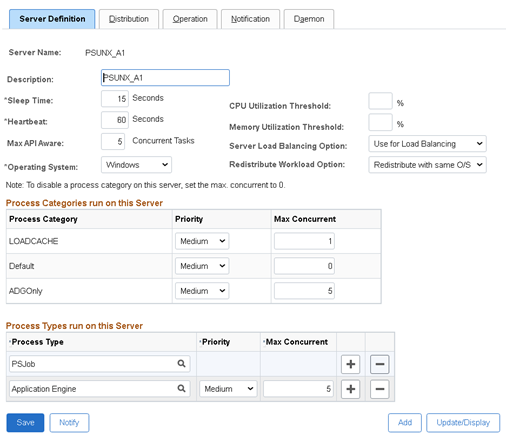
New process schedulers should be created for running ADG only jobs. They will only be connected to the standby database. The standby connection should be left blank. All of the SQL updates made by the Process Scheduler processes will be handled by DML redirection. You will need to have at least 2 so they do not become a single point of failure.
[Startup]
;=========================================================================
; Database Signon settings
;=========================================================================
DBName=FINADG
DBType=ORACLE
UserId=PSAPPS
UserPswd={V2}YoAQq7Ut4WBHJL89N9gv9E0AWwLaecGZ4qep
ConnectId=PEOPLE
ConnectPswd={V2}OlSYHuFMZa2c8uonfYkKk+3+APYvTU9N
StandbyDBName=
StandbyDBType=
StandbyUserId=
StandbyUserPswd=
These schedulers will ONLY run:
- Processes in the new ADGOnly process category.
- A single LOADCACHE category process will be permitted.
- The max concurrence of all other categories will be 0.
- Other process types such as SQR might be needed if they are to be run on the ADG standby
They should not run master process scheduler processes. This process should only run schedulers connected to the primary database.
Existing Process Schedulers
All process categories apply to all process schedulers. The concurrency of the ADG category should be set to 0 on all other process schedulers to prevent it from running there. These schedulers will remain connected to the primary database only. They will not be connected to the secondary database.
[Startup]
;=========================================================================
; Database Signon settings
;=========================================================================
DBName=FINPRD
DBType=ORACLE
UserId=PSAPPS
UserPswd={V2}EcxeV3mit3GMT5kDfz/z+s0L9B1aUb6ix04f
ConnectId=PEOPLE
ConnectPswd={V2}NtXafW7hlcGY016bhazl2kqqvlSNYMK1
StandbyDBName=
StandbyDBType=
StandbyUserId=
StandbyUserPswd=
Process Definition
Normally, the processes that are to be run on ADG should be marked read-only and then they will be scheduled using the secondary connection. However, Application Engine cannot be run in standalone PSAE mode via the second connection. So, the ADG process schedulers are configured to connect directly to the ADG database via the primary connection. Thus, the read-only flag has no effect. Instead, all read-only processes should be moved to the ADGOnly category.
Configuration by SQL
It may be easier to update the process scheduler configuration by SQL
- ADGOnly concurrency will be 0, or it will be the maximum API aware concurrency on ADG process schedulers.
- PSQUERY, any read-only processes, and any processes in ADGOnly category, will all be marked as being both read-only and in the ADGOnly category.
update pslock
set    version = version + 1
where  objecttypename IN('SYS','PPC')
/
update psversion
set    version = version + 1
where  objecttypename IN('SYS','PPC')
/
update  ps_servercategory c
set     maxconcurrent = CASE WHEN servername like 'PSUNX_A%'
                             THEN (SELECT s.maxapiaware FROM ps_serverdefn s
                                   WHERE  s.servername = c.servername)
                             ELSE 0 END
where   prcscategory = 'ADGOnly'
/
update ps_serverdefn
set    version = (SELECT version from psversion where objecttypename = 'PPC')
,      lastupddttm = systimestamp
/
update ps_prcsdefn
set    version = (SELECT version from psversion where objecttypename = 'PPC')
,      prcsreadonly = 1
,      prcscategory = 'ADGOnly'
,      lastupddttm = systimestamp
where  prcsreadonly = 1
or     prcscategory = 'ADGOnly'
or     prcsname = 'PSQUERY'
/
select prcstype, prcsname, prcscategory, prcsreadonly
from   ps_prcsdefn
where  prcsreadonly = 1
or     prcscategory = 'ADGOnly'
or     prcsname = 'PSQUERY'
/
select * from ps_servercategory
where prcscategory IN('ADGOnly')
order by 2,1
/
commit
/
Sample Output
PSOFT-FINADG>Select prcstype, prcsname, prcscategory, prcsreadonly
  2  From   ps_prcsdefn
  3  where  prcsreadonly = 1
  4  or     prcscategory = 'ADGOnly'
  5  or     prcsname = 'PSQUERY'
  6  /

PRCSTYPE                       PRCSNAME     PRCSCATEGORY                   P
------------------------------ ------------ ------------------------------ -
Application Engine             AEMINITEST   ADGOnly                        1
COBOL SQL                      PTPDBTST     ADGOnly                        1
SQR Report                     PTSQRTST     ADGOnly                        1
Application Engine             FB_GEN_EXTR  ADGOnly                        1
SQR Report                     XRFWIN       ADGOnly                        1
SQR Report                     SWPAUDIT     ADGOnly                        1
SQR Report                     SYSAUDIT     ADGOnly                        1
SQR Report                     XRFAPFL      ADGOnly                        1
SQR Report                     XRFAEPL      ADGOnly                        1
SQR Report                     XRFPGDZ      ADGOnly                        1
SQR Report                     DDDAUDIT     ADGOnly                        1
SQR Report                     XRFEVPC      ADGOnly                        1
SQR Report                     XRFFLPC      ADGOnly                        1
SQR Report                     XRFFLPN      ADGOnly                        1
SQR Report                     XRFFLRC      ADGOnly                        1
SQR Report                     XRFIELDS     ADGOnly                        1
SQR Report                     XRFMENU      ADGOnly                        1
SQR Report                     XRFPANEL     ADGOnly                        1
SQR Report                     XRFPCFL      ADGOnly                        1
SQR Report                     XRFPNPC      ADGOnly                        1
SQR Report                     XRFRCFL      ADGOnly                        1
SQR Report                     XRFRCPN      ADGOnly                        1
Application Engine             PSQUERY      ADGOnly                        1
Application Engine             PSCONQRS     ADGOnly                        1

SYSADM-FINADG>select * from ps_servercategory
  2  where prcscategory IN('ADGOnly')
  3  order by 2,1
  4  /

SERVERNA PRCSCATEGORY                   P MAXCONCURRENT
-------- ------------------------------ - -------------
…
PSNT     ADGOnly                        5             0
PSUNX    ADGOnly                        5             0
PSUNX_A1 ADGOnly                        5             5
…
PSQUERY Application Engine Amendment
If you have PS/Queries that reference a remote database via a database link then you may experience errors when you run them via the scheduled Application Engine process PSQUERY on an ADG database.
Using a database link, even if only for a query, starts a database transaction, and then you can't get DML redirect to work because it also starts a transaction. However, if you already have a transaction open through DML redirect you can't start the transaction associated with the database link. The two transactions become mutually exclusive.
PeopleTools 8.58.07 - Application Engine
Copyright (c) 1988-2021 Oracle and/or its affiliates.
All Rights Reserved

PeopleTools SQL Trace value: 159 (0x9f): /cs/psoft/cfg/FINPRD/appserv/prcs/FINPRDA1/log_output/AE_PSQUERY_xxxxxxxx/AE_PSQUERY_xxxxxxxx.trc
PeopleTools PeopleCode Trace value: 64 (0x40): /cs/psoft/cfg/FINPRD/appserv/prcs/FINPRDA1/log_output/AE_PSQUERY_xxxxxxxx/AE_PSQUERY_xxxxxxxx.trc

File: /vob/peopletools/src/pssys/qpm.cppSQL error. Stmt #: 8495  Error Position: 3055  Return: 16000 - ORA-16000: database or pluggable database open for read-only access
Failed SQL stmt: SELECT …
<a query that references a remote database via a database link>
…
Error in running query because of SQL Error, Code=16000, Message=ORA-16000: database or pluggable database open for read-only access  (50,380)

PeopleCode Exit(1) Abort invoked by Application at PSQUERY.MAIN.ExecQry. (108,543)

Process xxxxxxxx ABENDED at Step PSQUERY.MAIN.ExecQry (PeopleCode) -- RC = 16 (108,524)

Process %s ABENDED at Step %s.%s.%s (Action %s) -- RC = %s
So we need to close the transactions by making the PSQUERY application engine commit. Application Engine steps explicitly commit after each step. I have added an extra step added that does nothing, but Application Engine issues a commit
Disable Query Statistics
I have found that query statistics can cause a problem when the query is run on ADG.
PeopleTools 8.58.07 - Application Engine
Copyright (c) 1988-2021 Oracle and/or its affiliates.
All Rights Reserved

PeopleTools SQL Trace value: 159 (0x9f): /cs/psoft/cfg/FINPRD/appserv/prcs/FINPRDA2/log_output/AE_PSQUERY_19356674/AE_PSQUERY_19356674.trc

File: /vob/peopletools/src/pssys/qdmutil.cppSQL error. Stmt #: 4608  Error Position: 91  Return: 16397 - ORA-16397: statement redirection from Oracle Active Data Guard standby database to primary database failed
Failed SQL stmt: SELECT EXECCOUNT, AVGEXECTIME, AVGFETCHTIME, LASTEXECDTTM, AVGNUMROWS, OPRID, QRYNAME FROM PSQRYSTATS WHERE OPRID = :1 AND QRYNAME = :2 FOR UPDATE OF EXECCOUNT
Application Engine program PSQUERY ended normally
They can be disabled in the PIA
- Navigate to: PeopleTools, Utilities, Administration, Query Administration,
- Go to the last tab (Settings),
- Uncheck Run Query Statistics.
Enable Query Execution Logging
Query stats (logged in the table
PSQRYSTATS) are not particularly useful as they only compute average metrics over a period that is not defined. Instead, query execution logging (to the table
PSQRYEXECLOG) is far more useful for performance analysis because you know who ran the query when it ran, and how many rows it retrieved. It is enabled for individual queries. It can be enabled across the board with the following SQL.
update pslock
set    version = version + 1
where  objecttypename IN('SYS','QDM')
/
update psversion
set    version = version + 1
where  objecttypename IN('SYS','QDM')
/
update psqrydefn
set    version = (SELECT version from psversion where objecttypename = 'QDM')
,      execlogging = 'Y'
,      lastupddttm = systimestamp
where  execlogging != 'Y'
/
commit
/




 @go-faster.co.uk on BlueSky

 Posts
Posts


