Showing posts with label Priority. Show all posts

Thursday, January 25, 2024

Reducing the Operating System Priority of PeopleSoft Processes

PeopleSoft for the Oracle DBA

I wrote about controlling the operating system priority of processes in PeopleSoft Tuxedo domains in Chapters 13 of 14 of PeopleSoft for the Oracle DBA, but I think it is worth a note here.

On Linux and Unix systems, the nice command can be used to lower the operating system scheduling priority of a process (or a privileged can increase the priority). When a server has no free CPU, processes with a lower priority get less time on the CPU. However, when there is free CPU available, the scheduling priority does not affect the amount of CPU that the process can utilise. 

On Unix, the priority of a Tuxedo server process can be adjusted using the -n server command line option in the configuration. The parameters to this option are simply passed through to the nice(2) function. Hence, this option does not work on Windows.

PSPRCSRV        SRVGRP=BASE
                SRVID=101
                MIN=1
                MAX=1
                RQADDR="SCHEDQ"
                REPLYQ=Y
                CLOPT="-n 4 -sInitiateRequest -- -C psprcs.cfg -CD HR88 -PS PSUNX -A start -S PSPRCSRV"
The operating system priority of a process is inherited from its parent. Therefore, lowering the priority of the Process Scheduler running under Tuxedo will also lower the priority of the batch processes that it spawns. 
  • Therefore Stand-alone Application Engine processes (psae) and Cobol processes inherit the priority of the process scheduler server process (PSPRCSRV).
  • However, if the Application Engine server process (PSAESRV) is used, its priority can be set directly. 
There are some potential uses for this approach.
  • If the process scheduler is co-resident with the application server, then it could be run at a lower priority to ensure the online users get preferential allocation of CPU, and that online performance does not suffer excessively at the hands of the batch.
  • A system might have two websites: one for self-service and the other for the 'back-office' users. You could configure separate application servers for each site, and run the self-service application server is run at a lower priority. 

In PeopleSoft, I prefer to create additional variables in the configuration file (psprcs.cfg).

[Process Scheduler]
;=========================================================================
; General settings for the Process Scheduler
;=========================================================================
PrcsServerName=PSUNX
;-------------------------------------------------------------------------
;Reduce priority of Process Scheduler server process, set to 0 if not needed
Niceness=4
From PeopleTools 8.4, the Application Engine server process is configured by default. The priority of the AE server processes can then be controlled independently of the process scheduler by creating a separate variable in the PSAESRV section of the configuration file.  However, it is generally better to use standalone PSAE, unless you have many short-lived application engine processes, as in CRM (see Application Engine in Process Scheduler: PSAESRV Server Process -v- Standalone PSAE executable).   
[PSAESRV]
;=========================================================================
; Settings for Application Engine Tuxedo Server
;=========================================================================
;-------------------------------------------------------------------------
;Reduce priority of application engine server process, set to 0 if not needed
Niceness=5
In this example, I have reduced the priorities of both the process scheduler and AE servers, but the process scheduler is left with a higher priority than the AE servers. The new variables can then be referenced Tuxedo template file (psprcsrv.ubx).
{APPENG}
#
# PeopleSoft Application Engine Server
#
PSAESRV         SRVGRP=AESRV
                SRVID=1
                MIN={$PSAESRV\Max Instances}
                MAX={$PSAESRV\Max Instances}
                REPLYQ=Y
                CLOPT="-n {$PSAESRV\Niceness} -- -C {CFGFILE} -CD {$Startup\DBName} -S PSAESRV"
{APPENG}
…
PSPRCSRV        SRVGRP=BASE
                SRVID=101
                MIN=1
                MAX=1
                RQADDR="SCHEDQ"
                REPLYQ=Y
                CLOPT="-n {$Process Scheduler\Niceness} -sInitiateRequest -- -C {CFGFILE} -CD {$Startup\DBName} -PS {$Process Scheduler\PrcsServerName} -A start -S PSPRCSRV"
When the domain is configured in psadmin, the variables are resolved in the Tuxedo configuration file (psprcsrv.ubb).  The -n option can be seen in the server command-line options (CLOPT).
#
# PeopleSoft Application Engine Server
#
PSAESRV         SRVGRP=AESRV
                SRVID=1
                MIN=1
                MAX=1
                REPLYQ=Y
                CLOPT="-n 5 -- -C psprcs.cfg -CD HR88 -S PSAESRV"
…
PSPRCSRV        SRVGRP=BASE
                SRVID=101
                MIN=1
                MAX=1
                RQADDR="SCHEDQ"
                REPLYQ=Y
                CLOPT="-n 4 -sInitiateRequest -- -C psprcs.cfg -CD HR88 -PS PSUNX -A start -S PSPRCSRV"

Friday, November 10, 2023

Prioritising Scheduled Processes by Operator ID/Run Control

Batch processing is like opera (and baseball) - "It ain't over till the fat lady sings".  Users care about when it starts and when it finishes.  If the last process finishes earlier, then that is an improvement in performance. 

This note describes a method of additionally prioritising processes queued to run on the process scheduler in PeopleSoft by their requesting operator ID and run control.  Where processing consists of more instances of the same process than can run concurrently, it can be used to make the process scheduler run longer-running processes before shorter-running processes that were scheduled earlier, thus completing batch processing earlier.

In PeopleSoft, without customisation, it is only possible to prioritise processes queued to run on the process scheduler by assigning a priority to the process definition or their process category.  Higher priority processes are selected to be run in preference to lower priorities.  Otherwise, processes are run in the order of the time at which they are requested to run.

Problem Statement

During an overnight batch, many nVision report books are scheduled to run on the Windows process schedulers by one of several specific batch operator IDs.  Many more reports are scheduled than can run concurrently, so some execute while others queue.  Inevitably, the reports have widely varying execution times.  The maximum concurrency of the nVision report book (RPTBOOK) process definition has been set, and the Oracle database resource manager has also been configured, to prevent too many of these processes from overloading the database.

CPU Utilisation of BatchThis chart shows the database activity when the batch runs.  We often see what has come to be called the 'long tail' while we wait for just a few long-running processes to complete.


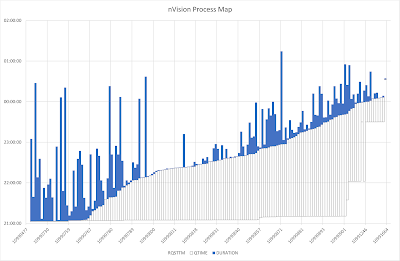
The next chart shows the processing time of each nVision report process.  The blue bars run from when the started to when it ended, ordered by start time.   The clear boxes below run from the time when it was requested to when it started, thus showing the period for which the processes were queued on a process scheduler, but were blocked because the maximum number of processes were already processing.
Process Map (without prioritisation)
All these processes run with the same priority because they are the same process definition.  Some long-running jobs execute earlier in the batch simply because they were scheduled earlier, but others that started later, run on beyond the end of the batch.  
It would be better if the longest-running processes were executed earlier, irrespective of the order in which they were requested.  Thus the shorter processes can run later as slots on the scheduler become free, and thus all processes should finished both closer together and earlier.
There is nothing delivered in the PeopleSoft process scheduler configuration that will let you assign different priorities to different executions of the same process.  In PeopleSoft, only three priorities are defined PRCSPRIORITY (1=Low, 5=Medium, 9=High) on the process definition and the server category.  These priorities are transferred to the process request queue (PSPRCSQUE.PRCSPRTY).  
If we could put our own priority into that column we could control the priority of the request.  

Solution

Introduce a database trigger that fires on insert into PSPRCSQUE and sets a priority specified on a new metadata table.  PRCSPRTY is not validated by PeopleSoft, and therefore any value can be specified.  
The files are available in a Github repository davidkurtz/psprcspty. The exact metadata will vary with the use case and requirements, but I provided some examples of how it might be generated.

Metadata Table: PS_XX_GFCPRCSPRTY

We need a table that will hold the priority for each combination of process type, process name, operation ID, and run control ID.  A corresponding record should be created using the Application Designer project in the GitHub repository.

create table sysadm.ps_xx_gfcprcsprty
(prcstype  VARCHAR2(30 CHAR) NOT NULL
,prcsname  VARCHAR2(12 CHAR) NOT NULL
,oprid     VARCHAR2(30 CHAR) NOT NULL
,runcntlid VARCHAR2(30 CHAR) NOT NULL
,prcsprty  NUMBER NOT NULL
--------------------optional columns
,avg_duration NUMBER NOT NULL
,med_duration NUMBER NOT NULL
,max_duration NUMBER NOT NULL
,cum_duration NUMBER NOT NULL
,tot_duration NUMBER NOT NULL
,num_samples  NUMBER NOT NULL
) tablespace ptapp;

create unique index sysadm.ps_xx_gfcprcsprty
on sysadm.ps_xx_gfcprcsprty(prcstype, prcsname, oprid, runcntlid) 
tablespace psindex compress 3;

Trigger Before Insert into PSPRCSQUE

As processes are scheduled in PeopleSoft, a row is inserted into the process scheduler queue table PSPRCSQUE.  A trigger will be created on this table that fires after the insert.  It will look for a matching row on the metadata table, PS_XX_GFCPRCSPRTY for the combination of process type, process name, operator ID, and run control ID.  If found, the trigger will assign the specified priority to the process request.  Otherwise, it will take no action.

CREATE OR REPLACE TRIGGER sysadm.psprcsque_set_prcsprty
BEFORE INSERT ON sysadm.psprcsque
FOR EACH ROW
WHEN (new.prcsname = 'RPTBOOK')
DECLARE
  l_prcsprty NUMBER;
BEGIN
  SELECT prcsprty
  INTO   l_prcsprty
  FROM   ps_xx_gfcprcsprty
  WHERE  prcstype = :new.prcstype
  AND    prcsname = :new.prcsname
  AND    oprid = :new.oprid
  AND    runcntlid = :new.runcntlid;
 
  :new.prcsprty := l_prcsprty;
EXCEPTION
  WHEN no_data_found THEN NULL;
  WHEN others THEN NULL;
END;
/
show errors

In this case, I am only assigning priorities to RPTBOOK processes, so I have added a when clause to the trigger so that it only fires for RPTBOOK process requests.  This can either be changed for other processes or removed entirely.

Priority Metadata

How the priorities should be defined will depend on the specific use case.  In some cases, you may choose to create a set of metadata that remains unchanged.

In this case, the objective is that the processes to take the longest to run should be executed first.  Therefore, I decided that the priority of each nVision report book process (by operator ID and run control ID) will be determined by the median elapsed execution time in the last two months.  The priorities are allocated such that the sum of the median execution times for each priority will be as even as possible.  

I have created a PL/SQL procedure GFCPRCSPRIORITY to truncate the metadata table and then repopulate it using a query on the process scheduler table (although, an Application Engine program could have been written to do this instead).  Some details of that query will vary with the exact use case. The procedure is executed daily, thus providing a feedback loop so if the run time varies over time, or new processes are added to the batch, it will be reflected in the priorities.

REM nvision_prioritisation_by_cumulative_runtime.sql

set serveroutput on
create or replace procedure sysadm.gfcprcspriority as
  PRAGMA AUTONOMOUS_TRANSACTION; --to prevent truncate in this procedure affecting calling session
  l_hist INTEGER := 61 ; --consider nVision processes going back this many days
begin
  EXECUTE IMMEDIATE 'truncate table ps_xx_gfcprcsprty';

--populate priorty table with known nVision processes 
insert into ps_xx_gfcprcsprty
with r as (
select r.prcstype, r.prcsname, r.prcsinstance, r.oprid, r.runcntlid, r.runstatus, r.servernamerun
, CAST(r.rqstdttm AS DATE) rqstdttm
, CAST(r.begindttm AS DATE) begindttm
, CAST(r.enddttm AS DATE) enddttm
from t, psprcsrqst r
  inner join ps.psdbowner p on r.dbname = p.dbname -- in test exclude any history copied from another database
where r.prcstype like 'nVision%' --limit to nVision processes
and r.prcsname like 'RPTBOOK' -- limit to report books
and r.enddttm>r.begindttm  --it must have run to completion
and r.oprid IN('NVISION','NVISION2','NVISION3','NVISION4')  --limit to overnight batch operator IDs
and r.begindttm >= TRUNC(SYSDATE)+.5-l_hist --consider process going back l_hist days from midday today
and r.runstatus = '9' --limit to successful processes
and r.begindttm BETWEEN ROUND(r.begindttm)-5/24 AND ROUND(r.begindttm)+5/24 --started between 7pm and 5am
), x as (
select r.*, CEIL((enddttm-begindttm)*1440) duration -–rounded up to the next minute
from r
), y as (
select prcstype, prcsname, oprid, runcntlid
, AVG(duration) avg_duration
, MEDIAN(CEIL(duration)) med_duration 
, MAX(duration) max_duration
, SUM(CEIL(duration)) sum_duration
, COUNT(*) num_samples
from x
group by prcstype, prcsname, oprid, runcntlid
), z as (
select y.* 
, sum(med_duration) over (order by med_duration rows between unbounded preceding and current row) cum_duration 
, sum(med_duration) over () tot_duration
from y
)
select prcstype, prcsname, oprid, runcntlid 
, avg_duration, med_duration, max_duration, cum_duration, tot_duration, num_samples
--, CEIL(LEAST(tot_duration,cum_duration)/tot_duration*3)*4-3 prcsprty  --3 priorities
, CEIL(LEAST(tot_duration,cum_duration)/tot_duration*9) prcsprty  --9 priorities
--, DENSE_RANK() OVER (order by med_duration) prcsprty --unlimited priorities
from z
order by prcsprty, cum_duration;

  dbms_output.put_line(sql%rowcount||' rows inserted');
  commit;

end gfcprcspriority;
/
show errors
In testing, I found that using just the 3 delivered levels of priority was not sufficiently granular to prioritise the jobs adequately, so I chose to use 9 levels (1 to 9).  The process priority on PRCSQUE is not validated, so I can use any value.  I also found I could just rank the processes from 1 to n by duration, and that would also work.

It is possible to create additional priority levels for process categories (see also More Process Priority Levels for the Process Scheduler), but that still only works for prioritising different processes over each other.

Metadata

This is the metadata produced on a test system by the above query.  It will vary depending on what has been run recently, and how it performed.  There are more, shorter processes in the lower priority groups, and fewer, longer processes in the higher priority groups.  

PRCSTYPE                       PRCSNAME     OPRID        RUNCNTLID                        PRCSPRTY
------------------------------ ------------ ------------ ------------------------------ ----------
…
nVision-ReportBook             RPTBOOK      NVISION2     NVS_RPTBK_XXX1                          1
nVision-ReportBook             RPTBOOK      NVISION2     NVS_RPTBK_XXX3                          1
nVision-ReportBook             RPTBOOK      NVISION2     NVS_RPTBK_LLLL8                         1
…
nVision-ReportBook             RPTBOOK      NVISION2     NVS_RPTBK_LLLL9                         2
nVision-ReportBook             RPTBOOK      NVISION      NVS_RPTBOOK_STAT8                       2
nVision-ReportBook             RPTBOOK      NVISION      NVS_RPTBOOK_STAT1                       2
…
nVision-ReportBook             RPTBOOK      NVISION2     NVS_RPTBK_TEMPXX                        6
nVision-ReportBook             RPTBOOK      NVISION      NVS_RPTBOOK_3                           6
nVision-ReportBook             RPTBOOK      NVISION      NVS_RPTBOOK_17                          6
nVision-ReportBook             RPTBOOK      NVISION      NVS_RPTBOOK_STAT4                       7
nVision-ReportBook             RPTBOOK      NVISION      NVS_RPTBOOK_28                          7
nVision-ReportBook             RPTBOOK      NVISION2     NVS_RPTBK_INCXXX                        8
nVision-ReportBook             RPTBOOK      NVISION2     NVS_RPTBK_MORYYY1                       8
nVision-ReportBook             RPTBOOK      NVISION      NVS_RPTBOOK_24                          9
nVision-ReportBook             RPTBOOK      NVISION      NVS_RPTBOOK_16                          9

A Test Script

This test script inserts some dummy rows into PSPRCSQUE to check whether a priority is assigned by the trigger. The insert is then rolled back.

INSERT INTO psprcsque (prcsinstance, prcstype, prcsname, oprid, runcntlid)
VALUES (-42, 'nVision-ReportBook', 'RPTBOOK', 'NVISION','NVS_RPTBOOK_17');
INSERT INTO psprcsque (prcsinstance, prcstype, prcsname, oprid, runcntlid)
VALUES (-43, 'nVision-ReportBook', 'RPTBOOK', 'NVISION','NVS_RPTBOOK_STAT1');
select prcsinstance, prcstype, prcsname, oprid, runcntlid, prcsprty from psprcsque where prcsinstance IN(-42,-43);
rollback;

You can see that it was successful because priorities 2 and 7 were assigned.

PRCSINSTANCE PRCSTYPE                       PRCSNAME     OPRID        RUNCNTLID                        PRCSPRTY
------------ ------------------------------ ------------ ------------ ------------------------------ ----------
         -43 nVision-ReportBook             RPTBOOK      NVISION      NVS_RPTBOOK_STAT1                       2
         -42 nVision-ReportBook             RPTBOOK      NVISION      NVS_RPTBOOK_17                          7

Monitoring Script

This query in script process_prioritisation_by_cumulative_runtime_report.sql reports on the average, median, and cumulative median execution time for each nVision process that ran to success during the overnight processing window as calculated by the package GFCPRCSPRIORITY and stored in PS_XX_GFCPRCSPRTY.  It also compares that to the priority and last actual run time for that process.

Example Output

                                                                                                      Cum.                                            
                                                                        Average   Median            Median    Total         Last Run   Actual                   
                                                                  Prcs Duration Duration Duration Duration Duration     Num  Process Duration Duration Duration Priorty
PRCSTYPE             PRCSNAME   OPRID        RUNCNTLID            Prty   (mins)   (mins)   (mins)   (mins)   (mins) Samples Priority   (mins)    Diff    % Diff    Diff
-------------------- ---------- ------------ -------------------- ---- -------- -------- -------- -------- -------- ------- -------- -------- -------- -------- -------
nVision-ReportBook   RPTBOOK    NVISION      NVS_RPTBOOK_4           9    90.65      131      209     1834     1997      23        6      189       58       44       3 
nVision-ReportBook   RPTBOOK    NVISION      NVS_RPTBOOK_16          9   159.17      163      209     1997     1997      23        9      177       14        9       0

nVision-ReportBook   RPTBOOK    NVISION      NVS_RPTBOOK_14          8    89.26      127      215     1703     1997      23        6      167       40       31       2
nVision-ReportBook   RPTBOOK    NVISION      NVS_RPTBOOK_24          8   115.87      117      165     1576     1997      23        9      144       27       23      -1

nVision-ReportBook   RPTBOOK    NVISION2     NVS_RPTBK_MORYYY1       7    93.13       85      165     1459     1997      23        8      158       73       86      -1
nVision-ReportBook   RPTBOOK    NVISION      NVS_RPTBOOK_28          7    88.30       80      172     1374     1997      23        8      108       28       35      -1

nVision-ReportBook   RPTBOOK    NVISION2     NVS_RPTBK_INCXXX        6    83.61       79      149     1294     1997      18        7      118       39       49      -1
nVision-ReportBook   RPTBOOK    NVISION      NVS_RPTBOOK_17          6    70.96       69      105     1143     1997      23        7       81       12       17      -1
nVision-ReportBook   RPTBOOK    NVISION      NVS_RPTBOOK_STAT4       6    68.00       72       81     1215     1997       8        7       81        9       13      -1

nVision-ReportBook   RPTBOOK    NVISION2     NVS_RPTBK_MMMMMM        5    52.45       46      119      914     1997      22        5       91       46      100       0
nVision-ReportBook   RPTBOOK    NVISION2     NVS_RPTBK_TEMPXX        5    50.48       49      104      963     1997      23        5       94       45       92       0
nVision-ReportBook   RPTBOOK    NVISION      NVS_RPTBOOK_3           5    55.52       55       99     1018     1997      23        6       79       24       44      -1
nVision-ReportBook   RPTBOOK    NVISION      NVS_RPTBOOK_1           5    47.70       56      137     1074     1997      23        4       56        0        0       1
…

Monitoring Query

The query in prcsmap.sql is used to produce the data for a map of the processes, showing request time, time spent queuing, and time spent executing.  It is the basis of the second chart above. I normally run this in SQL Developer and export the data as an Excel workbook.  There is an example spreadsheet in the Github repository.

9 levels of Prioritisation

With prioritisation, we can see that the long-running jobs with higher priority ran earlier.  

We can also see that some of the higher-priority jobs that are scheduled later are running earlier than those scheduled earlier, and are thus finishing earlier.

There is no longer any tail of processing.  Instead, load drops quickly at the end of the batch, and the batch as a whole finishes earlier.





Thursday, March 03, 2011

More Process Priority Levels for the Process Scheduler

This note started out as an idea for how to add more priority levels to the PeopleSoft Process Scheduler to improve control over prioritisation of processes in a complex batch. While testing I found some interesting behaviour that I had not expected. I will also explain how I did some of my tests, because they are easily reproducible.

More Priority Levels

By default, PeopleSoft process can be given priority 1 (low), 5 (medium), and 9 (high). If the Process Scheduler is too busy to start all the processes scheduled to be started, it starts the higher priority ones in preference to the lower priority.

That’s fine, but sometimes in a very complex batch environment 3 process levels are not enough, and it would be useful to have more priority levels so that it is possible to define the hierarchy of processing to a finer level.

There does not appear to be anything special about the priorities delivered by PeopleSoft. They do not appear to be hard-coded anywhere within the SQL submitted Process Scheduler. As you might expect, some of the queries are sorted in descending order of priority.

The priority of a process in the Process Scheduler is defined by the single character field PRCSPRIORITY on the record PRCSDEFN. All you have to do is define addition translate values

The new priorities can be assigned via the delivered components.

I started with the intention of applying the new priority level to processes through the delivered component. However, I encountered some quirky behaviour from the Process Scheduler and Master Process Scheduler. There is something happening inside the programs rather than the SQL where they do not always take the process with the highest priority if that priority is not one of the delivered values. Therefore, I do not recommend using the new priorities on process definitions.

However, Server Categories also have priorities. Testing has shown that the priority of the Process Category take precedence over the priority on the Process Definition.

The new server categories should be defined in the Process Category Administration page of the Process Scheduler System Settings component


Then priorities and maximum concurrencies can be assigned to the categories in each Process Scheduler Server definition.


Testing the Additional Priorities
I have (with some assistance) constructed a simple test harness. I have an Application Engine program, AE_SLEEP, that does nothing, but sleeps for a period of time by calling the Java Sleep() method in a PeopleCode step.

Local JavaObject &Obj;Local ProcessRequest &RQST;
MessageBox(0, "", 0, 0, "Sleep Begin for " | GFC_SLEEP_AET.DURATION.Value | " seconds ");

&Obj = CreateJavaObject("java.lang.Thread");&Obj.start();
&Obj.sleep(GFC_SLEEP_AET.DURATION.Value * 1000);

MessageBox(0, "", 0, 0, "Sleep END");

I have a number of other Application engine programs that have different priorities, or that are in categories with different priorities, that call AE_SLEEP.

Finally, there is a process AE_SLEEP_RUN which submits requests for the other processes based on a control table. In this test I will be setting up some test data to demonstrate how the Process Scheduler behaves, in the next article, I will be modeling the behaviour of a real batch load from a real system

TRUNCATE TABLE ps_gfc_sleep_rc
/
INSERT INTO ps_gfc_sleep_rc
(run_cntl_id, prcstype, prcsname, offset_amount, duration, rundttm, last_run_cntl_id, next_run_cntl_id)
SELECT level, 'Application Engine', 'AE_SLEEP'||level, 5*level, 175, NULL, ' ', ' '
FROM dual CONNECT BY level <= 9
/
COMMIT
/ 
ALTER SESSION SET NLS_DATE_FORMAT='hh24:mi:ss';
set lines 120
COLUMN run_cntl_id FORMAT a8 heading 'Run|Control'
COLUMN last_run_cntl_id FORMAT a8 heading 'Last|Run|Control'
COLUMN next_run_cntl_id FORMAT a8 heading 'Next|Run|Control'
COLUMN prcsinstance FORMAT 99999 HEADING 'PRCS|INSTANCE'
COLUMN offset_amount FORMAT 9999 HEADING 'Offset|Amount'
COLUMN rownum FORMAT 99 HEADING 'Row|#'
COLUMN prcstype FORMAT a18
COLUMN prcsname FORMAT a12
COLUMN prcsprty FORMAT 9 HEADING 'PRCS|PRTY'
COLUMN prcscategory FORMAT a11 HEADING 'PRCS|CATEGORY'
COLUMN serverassign FORMAT a6 HEADING 'SERVER|ASSIGN'
COLUMN runstatus FORMAT a6 HEADING 'RUN|STATUS' 
 
SELECT run_cntl_id, prcsname, offset_amount, duration, rundttm 
FROM ps_gfc_sleep_rc
/

So the AE_SLEEP_RUN will schedule one process every 5 seconds. The lowest priority processes are scheduled first.

Run                            Offset
Control  PRCSNAME     RUNDTTM  Amount   DURATION
-------- ------------ -------- ------ ----------
1        AE_SLEEP1                  5        175
2        AE_SLEEP2                 10        175
3        AE_SLEEP3                 15        175
4        AE_SLEEP4                 20        175
5        AE_SLEEP5                 25        175
6        AE_SLEEP6                 30        175
7        AE_SLEEP7                 35        175
8        AE_SLEEP8                 40        175
9        AE_SLEEP9                 45        175

I can query what actually happened with the following SQL.

SELECT rownum, a.* 
FROM (
   SELECT SYSDATE, q.prcsinstance, q.prcsname, q.prcsprty, q.rundttm
   , r.begindttm, r.enddttm, q.serverassign, q.runstatus
   --, r.prcscategory
   FROM psprcsrqst r, psprcsque q
   WHERE r.prcsinstance = q.prcsinstanceAND r.prcsname like 'AE_SLEEP_'
   AND r.prcsinstance > (
      SELECT MAX(prcsinstance)
      FROM psprcsrqst
      WHERE prcsname = 'AE_SLEEP_RUN' AND runstatus = '9')
ORDER BY r.begindttm, q.prcsprty DESC, q.rundttm, r.prcsinstance) a
/

In all of the examples below, the first three low-priority processes run first because they are scheduled to run and therefore start before the higher priority processes are scheduled. The Process Scheduler is then blocked until all the other processes are due to have run, and so priority determines while processes the scheduler starts next.

However, due to a quirk in Process Scheduler, the processes are not assigned to the Process Scheduler in time order. In the following example, AE_SLEEP5 was executed before AE_SLEEP6.

Row           PRCS
#   SYSDATE   INSTANCE PRCSNAME     RUNDTTM  BEGINDTTM ENDDTTM
--- --------- -------- ------------ -------- --------- --------
  1 13:14:17      4583 AE_SLEEP1    13:03:27 13:03:55  13:07:08
  2 13:14:17      4584 AE_SLEEP2    13:03:32 13:03:55  13:07:08
  3 13:14:17      4585 AE_SLEEP3    13:03:37 13:03:55  13:07:08
  4 13:14:17      4591 AE_SLEEP9    13:04:07 13:07:12  13:10:27
  5 13:14:17      4587 AE_SLEEP5    13:03:47 13:07:13  13:10:27
  6 13:14:17      4588 AE_SLEEP6    13:03:52 13:07:13  13:10:27
  7 13:14:17      4586 AE_SLEEP4    13:03:42 13:10:31  13:13:46
  8 13:14:17      4589 AE_SLEEP7    13:03:57 13:10:47  13:14:01
  9 13:14:17      4590 AE_SLEEP8    13:04:02 13:10:47  13:14:01

But if the non-standard priority jobs are put in a different category, they are executed in the right order. It would appear that there is some logic in the Master Process Scheduler (and not in the SQL queries it submits) that works category by category.

Row              PRCS              PRCS                            SERVER RU
  # SYSDATE  INSTANCE PRCSNAME     PRTY RUNDTTM  BEGINDTT ENDDTTM  ASSIGN ST PRCSCATEGORY
--- -------- -------- ------------ ---- -------- -------- -------- ------ -- ------------
  1 17:44:21     4681 AE_SLEEP5       5 17:31:10 17:31:24 17:34:39 PSNT   9  Default
  2 17:44:21     4682 AE_SLEEP5       5 17:31:13 17:31:24 17:34:39 PSNT   9  Default
  3 17:44:21     4683 AE_SLEEP5       5 17:31:16 17:31:40 17:34:56 PSNT   9  Default
  4 17:44:21     4690 AE_SLEEP7       7 17:32:43 17:34:43 17:37:57 PSNT   9  Priority 9
  5 17:44:21     4689 AE_SLEEP7       7 17:32:44 17:34:43 17:37:57 PSNT   9  Priority 9
  6 17:44:21     4688 AE_SLEEP7       7 17:32:45 17:34:59 17:38:14 PSNT   9  Priority 9
  7 17:44:21     4687 AE_SLEEP7       7 17:32:46 17:38:01 17:41:16 PSNT   9  Priority 9
  8 17:44:21     4684 AE_SLEEP5       5 17:31:19 17:38:01 17:41:16 PSNT   9  Default
  9 17:44:21     4685 AE_SLEEP5       5 17:31:22 17:38:17 17:41:33 PSNT   9  Default 
 10 17:44:21     4686 AE_SLEEP5       5 17:31:25 17:41:20 17:44:20 PSNT   9  Default

If there are two new priorities in the new category, then they do not run in the right order.

Row              PRCS              PRCS                            SERVER RUN
  # SYSDATE  INSTANCE PRCSNAME     PRTY RUNDTTM  BEGINDTT ENDDTTM  ASSIGN STATUS PRCSCATEGORY
--- -------- -------- ------------ ---- -------- -------- -------- ------ ------ ------------
  1 19:01:58     4716 AE_SLEEP5       5 18:06:58 18:07:26 18:10:40 PSNT   9      Default
  2 19:01:58     4718 AE_SLEEP5       5 18:07:04 18:07:26 18:10:40 PSNT   9      Default
  3 19:01:58     4719 AE_SLEEP5       5 18:07:07 18:07:26 18:10:40 PSNT   9      Default
  4 19:01:58     4723 AE_SLEEP6       6 18:08:25 18:10:44 18:13:43 PSNT   9      Priority 9
  5 19:01:58     4722 AE_SLEEP6       6 18:08:30 18:10:44 18:13:43 PSNT   9      Priority 9
  6 19:01:58     4717 AE_SLEEP5       5 18:07:01 18:10:44 18:13:43 PSNT   9      Default
  7 19:01:58     4724 AE_SLEEP7       7 18:08:40 18:14:02 18:17:00 PSNT   9      Priority 9
  8 19:01:58     4725 AE_SLEEP7       7 18:08:45 18:14:02 18:17:00 PSNT   9      Priority 9
  9 19:01:58     4720 AE_SLEEP5       5 18:07:10 18:14:02 18:17:00 PSNT   9      Default
 10 19:01:58     4721 AE_SLEEP5       5 18:07:13 18:17:18 18:20:17 PSNT   9      Default

However, if I create a separate category for each priority, and assign the priority to that category in the server definition, then the processes run in the desired order.

Row              PRCS              PRCS                            SERVER RUN
  # SYSDATE  INSTANCE PRCSNAME     PRTY RUNDTTM  BEGINDTT ENDDTTM  ASSIGN STATUS PRCSCATEGORY
--- -------- -------- ------------ ---- -------- -------- -------- ------ ------ ------------
  1 19:38:00     4740 AE_SLEEP5       5 19:25:10 19:25:23 19:28:23 PSNT   9      Default
  2 19:38:00     4741 AE_SLEEP5       5 19:25:13 19:25:39 19:28:38 PSNT   9      Default
  3 19:38:00     4742 AE_SLEEP5       5 19:25:16 19:25:39 19:28:38 PSNT   9      Default
  4 19:38:00     4748 AE_SLEEP7       7 19:26:52 19:28:41 19:31:41 PSNT   9      Priority 7
  5 19:38:00     4749 AE_SLEEP7       7 19:26:57 19:28:58 19:31:56 PSNT   9      Priority 7
  6 19:38:00     4747 AE_SLEEP6       6 19:26:37 19:28:58 19:31:56 PSNT   9      Priority 6
  7 19:38:00     4746 AE_SLEEP6       6 19:26:42 19:32:00 19:34:59 PSNT   9      Priority 6
  8 19:38:00     4743 AE_SLEEP5       5 19:25:19 19:32:16 19:35:15 PSNT   9      Default
  9 19:38:00     4744 AE_SLEEP5       5 19:25:22 19:32:16 19:35:16 PSNT   9      Default
 10 19:38:00     4745 AE_SLEEP5       5 19:25:25 19:35:02 19:37:59 PSNT   9      Default

Conclusion
The Process Scheduler does not reliably take process priorities into account when scheduling processes,  so I do not recommend using the additional priorities on processes, just the three delivered priorities (1, 5, and 9).

However, all the priorities do work properly on process categories. The priority of the server class does not appear to have any effect (I have not produced results for those tests here).

The priority of the category to which a process belongs takes precedence over the priority of the process. Thus a low priority process in a high priority category will be executed by the Process Scheduler in preference to a high priority process in a low priority category. Naturally if two processes are in the same category, or categories of equal priority, the higher priority process will be scheduled first.

Acknowledgements
My thanks to Andy Mason of Business Integrations for contributing to the initial concept and the Java code to make Application Engine sleep and assistance with the test harness.

Further Reading
I have published a paper on my website that describes how to extend this technique to model a real production batch, and predict the impact of Process Scheduler configuration changes.