Tuesday, October 01, 2024

Cursor Sharing in Scheduled Processes: 2. What happens during SQL Parse? What is a 'hard' parse? What is a 'soft' parse?

This is the second in a series of 4 posts about the selective use of cursor sharing in scheduled processes in PeopleSoft.

  1. Introduction
  2. What happens during SQL Parse?  What is a 'hard' parse?  What is a 'soft' parse?  The additional overhead of a hard parse.
  3. How to set CURSOR_SHARING for specific scheduled processes.
  4. How to identify candidate processes for cursor sharing.

To understand why cursor sharing can be beneficial it is necessary to understand

  • What happens when Oracle parses and executes a SQL statement?.
  • How some PeopleSoft processes dynamically construct SQL statements

SQL Processing: 'Hard' Parse -v- 'Soft' Parse
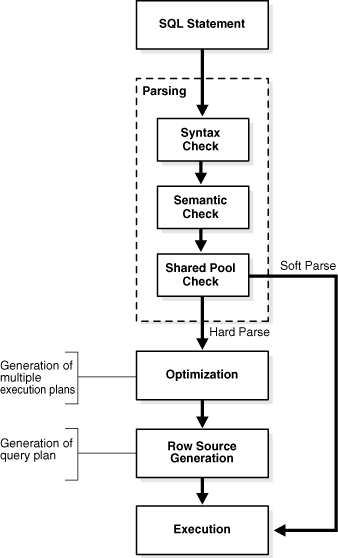
Oracle SQL Parse Flow
SQL parse processing is set out in various places in the Oracle database documentation
When a statement is submitted to the database it goes through a number of stages of parsing before it is executed. 
  • Syntax Check: Is the statement syntactically valid?
  • Semantic Check:  Is the statement meaningful?  Do the referenced objects exist and is the user allowed to access them?
  • SGA Check: Does the statement already exist in the shared SQL area?  
The database looks for an exact matching statement in the shared SQL area. If it is not found, the database must perform additional tasks called 'hard' parsing.  The stages performed up to this point are referred to as 'soft parsing'.
  • Generation of the optimal execution plan
  • Row Source Generation - The execution plan is used to generate an iterative execution plan that is usable by the rest of the database.
Thus the Oracle Database must perform a 'hard' parse at least once for every unique DML statement.

What is Cursor Sharing?

A cursor is a name or handle for a private SQL area that contains session-specific information about a statement, including bind variables, state information and result sets.  A cursor in the private area points to the shared SQL area in the library cache that contains the parse tree and execution plan for a statement.  Multiple private areas can reference a single shared SQL area.  This is known as cursor sharing.

The database allows only textually identical statements to share a cursor. By default, the CURSOR_SHARING parameter is set to EXACT, and thus is disabled.  "The optimizer generates a plan for each statement based on the literal value."
When CURSOR_SHARING is set to FORCE, the database replaces literal values with system-generated variables.  The database still only exactly matches statements, but after the literal values have been substituted, thus giving the appearance of matching statements that differ only by their literal values.  "For statements that are identical after bind variables replace the literals, the optimizer uses the same plan. Using this technique, the database can sometimes reduce the number of parent cursors in the shared SQL area." The database only performs a soft parse.  
In systems, such as PeopleSoft, that generate many distinct statements, cursor sharing can significantly reduce hard parse, and therefore CPU and time spent on it.

Sources of Hard Parse in PeopleSoft

PeopleSoft has a deserved reputation for suffering from high volumes of SQL hard parse.  Generally, the cause of this is dynamically generated code.  Often each statement has different literal values. 
  • In Application Engine, %BIND() resolves to a literal value rather than bind variable in the resulting SQL statement unless the ReUseStatement attribute is enabled.  The problem is that it is disabled by default, and there are limitations to when it can be set.
  • Dynamic statements in COBOL processes.  This is effectively the same behaviour as Application Engine, but here the dynamic generation of SQL is hard-coded in the COBOL from a combination of static fragments and configuration data. PeopleSoft COBOL programs generally just embed literal values in such statements because it is easier than creating dynamic SQL statements with possibly varying numbers of bind variables.
  • In nVision where 'dynamic selectors' and 'use literal values' tree performance options are selected.  These settings are often preferable because the resulting SQL statements can make effective use of Bloom filters and Hybrid Column Compression (on Exadata).  The penalty is that it can lead to more hard parse operations.

ReUseStatement -v- Cursor  Sharing

Of course, it would be better if PeopleSoft SQL used bind variables more often, rather than literal values. 
In Application Engine, if the ReUseStatement attribute is set on a step, then bind variables in Application Engine remain bind variables in the resulting SQL and are not converted back to literals.  
This can reduce both the amount of time Application Engine spends dynamically generating SQL statements before submitting them to the database as well as the time the database spends parsing them (see Minimising Parse Time in Application Engine with ReUseStatement). 
However, this attribute is not set by default on newly created Application Engine steps in Application Designer.  This was to maintain backward compatibility with programs created in earlier versions of PeopleTools.
However, there are restrictions to where it cannot be used.  Most commonly because %BIND(…NOQUOTES) has been used to dynamically generate part of the statement based on configuration data.
Over the years, PeopleSoft development has got much better at setting this attribute where possible in the delivered application code.  Nonetheless, there are still places where it could be added.  
See also:
However, there are some considerations before we add it ourselves.
  • ReUseStatement cannot be introduced across the board, but only on steps that meet certain criteria set out in the documentation.  It doesn't work when dynamic code is generated with %BIND(…,NOQUOTES), or if a %BIND() is used in a SELECT clause.  Worse, setting this attribute incorrectly can cause the application to function incorrectly.  So each change has to be tested carefully.
  • When a customer sets the ReUseStatement attribute in the delivered code, it is a customisation to an Application Engine step that has to be migrated using Application Designer.  It then has to be maintained to ensure that subsequent PeopleSoft releases and patches do not revert it.
  • There is no equivalent option for PeopleSoft COBOL, SQR, or nVision.  The way that SQL is generated in each is effectively hard-coded.

Recommendation: It is not a case of either ReUseStatement or Cursor Sharing.  It may be both.  If you are writing your own Application Engine code, or customising delivered code anyway, then it is usually advantageous to set ReUseStatement where you can.  You will save non-database execution time as well as database time because you are then using bind variables, and Application Engine does not have to spend time generating the text of a new SQL statement with new literal values for every execution.  You may still benefit from cursor sharing for statements where you cannot set ReUseStatement.  

However, as you will see in the last article in this series, cursor sharing is not always effective, you have to test.

Monday, September 30, 2024

Cursor Sharing in Scheduled Processes: 1. Introduction

This is the first in a series of 4 posts about the selective use of cursor sharing in scheduled processes in PeopleSoft.

  1. Introduction
  2. What happens during SQL Parse?  What is a 'hard' parse?  What is a 'soft' parse?  The additional overhead of a hard parse.
  3. How to set CURSOR_SHARING for specific scheduled processes.
  4. How to identify candidate processes for cursor sharing.

PeopleSoft applications make extensive use of configuration data that is then interpreted by dynamic code. This leads to lots of similar statements with different literal values; statements that differ only by literal values are still different. In an Oracle database, each statement that cannot be exactly matched with a statement already in the Shared SQL Area (also known as the Cursor Cache) must be parsed.  Thus, each distinct statement must be parsed at least once.  
Hence, PeopleSoft systems have many SQL statements that are only ever executed once,each of which has to be fully parsed.  This is often called a 'hard' parse.  With PeopleSoft, this parse overhead can have a significant impact on performance.
In an Oracle database, CURSOR_SHARING can be set to FORCE (the default is EXACT). Then, it will substitute the literals with system-generated bind variables. The statement is still exactly matched against the contents of the Shared SQL Area, but now statements that previously only differed by their literal values will match the same bind variables.  Oracle can omit some of the parse processing for matched statements, leaving what is often called a 'soft' parse. This can significantly reduce the CPU overhead of SQL parse, and thus improve the performance of some processes.

Do not set CURSOR_SHARING to FORCE at database level.  Over the years, I have tried this several times with different PeopleSoft systems, and on various different versions of Oracle.  The net result was always negative. Some things improved, but many more degraded and often to a greater extent.

However, I have found that it can be effective to set it at session-level for specific processes, and sometimes just specific run controls for specific processes.  

What is Oracle's advice?

Oracle has always been clear that it is always better to write sharable SQL (i.e. that uses bind variables), and that setting CURSOR_SHARING = FORCE should not be used as a permanent fix.
As a general guideline, the Oracle Real-World Performance group recommends against setting CURSOR_SHARING to FORCE except … when all of the following conditions are met:
  1. Statements in the shared pool differ only in the values of literals 
  2. Response time is suboptimal because of a very high number of library cache misses.
  3. Your existing code has a serious security and scalability bug—the absence of bind variables—and you need a temporary band-aid until the source code can be fixed.
  4. You set this initialization parameter at the session level and not at the instance level.
See SQL Tuning Guide: Improving Real-World Performance Through Cursor Sharing -> Real-World Performance Guidelines for Cursor Sharing -> Do Not Use CURSOR_SHARING = FORCE as a Permanent Fix

I submit that my approach in PeopleSoft meets at least 3 these of conditions.  As for the third criterion, we are talking about SQL statements that are either delivered as part of PeopleSoft code or that are dynamically generated from configuration data, also by delivered code.  The reality is that these are as 'fixed' as they are going to be within PeopleSoft.  Most of this code is at least very difficult, if not impossible, for the customer to alter, and the cost and risk of owning and maintaining any such customisation is almost certainly prohibitive.  Cursor sharing may be a band-aid, but it will be there for the long term.

The next article looks at how the Oracle database parses SQL statements.

Thursday, April 11, 2024

Configuring Shared Global Area (SGA) in a Multitenant Database with a PeopleSoft Pluggable Database (PDB)

I have been working on a PeopleSoft Financials application that we have converted from a stand-alone database to be the only pluggable database (PDB) in an Oracle 19c container database (CDB).  We have been getting shared pool errors in the PDB that lead to ORA-4031 errors in the PeopleSoft application.  

I have written a longer version of this article on my Oracle blog, but here are the main points.

SGA Management with a Parse Intensive System (PeopleSoft).

PeopleSoft systems dynamically generate lots of non-shareable SQL code.  This leads to lots of parse and consumes more shared pool.  ASMM can respond by shrinking the buffer cache and growing the shared pool.  However, this can lead to more physical I/O and degrade performance and it is not beneficial for the database to cache dynamic SQL statements that are not going to be executed again.  Other parse-intensive systems can also exhibit this behaviour.

In PeopleSoft, I normally set DB_CACHE_SIZE and SHARED_POOL_SIZE to minimum values to stop ASMM shuffling too far in either direction.  With a large SGA, moving memory between these pools can become a performance problem in its own right.  

We removed SHARED_POOL_SIZE, DB_CACHE_SIZE and SGA_MIN_SIZE settings from the PDB.  The only SGA parameters set at PDB level are SGA_TARGET and INMEMORY_SIZE.  

SHARED_POOL_SIZE and DB_CACHE_SIZE are set as I usually would for PeopleSoft, but at CDB level to guarantee a minimum buffer cache size.  

This is straightforward when there is only one PDB in the CDB.   I have yet to see what happens when I have another active PDB with a non-PeopleSoft system and a different kind of workload that puts less stress on the shared pool and more on the buffer cache.

Initialisation Parameters

  • SGA_TARGET "specifies the total size of all SGA components".  Use this parameter to control the memory usage of each PDB.  The setting at CDB must be at least the sum of the settings for each PDB.
    • Recommendations:
      • Use only this parameter at PDB level to manage the memory consumption of the PDB.
      • In a CDB with only a single PDB, set SGA_TARGET to the same value at CDB and PDB levels.  
      • Therefore, where there are multiple PDBs, SGA_TARGET at CDB level should be set to the sum of the setting for each PDB.  However, I haven't tested this yet.
      • There is no recommendation to reserve SGA for use by the CDB only, nor in my experience is there any need so to do.
  • SHARED_POOL_SIZE sets the minimum amount of shared memory reserved to the shared pool.  It can optionally be set in a PDB.  
    • Recommendation: However, do not set SHARED_POOL_SIZE at PDB level.  It can be set at CDB level.
  • DB_CACHE_SIZE sets the minimum amount of shared memory reserved to the buffer cache. It can optionally be set in a PDB.  
    • Recommendation: However, do not set DB_CACHE_SIZE at PDB level.  It can be set at CDB level.
  • SGA_MIN_SIZE has no effect at CDB level.  It can be set at PDB level at up to half of the manageable SGA
    • Recommendation: However, do not set SGA_MIN_SIZE.
  • INMEMORY_SIZE: If you are using in-memory query, this must be set at CDB level in order to reserve memory for the in-memory store.  The parameter defaults to 0, in which case in-memory query is not available.  The in-memory pool is not managed by Automatic Shared Memory Management (ASMM), but it does count toward the total SGA used in SGA_TARGET.
    • Recommendation: Therefore it must also be set in the PDB where in-memory is being used, otherwise we found(contrary to the documetntation) that the parameter defaults to 0, and in-memory query will be disabled in that PDB.

Oracle Notes

  • About memory configuration parameter on each PDBs (Doc ID 2655314.1) – Nov 2023
    • As a best practice, please do not to set SHARED_POOL_SIZE and DB_CACHE_SIZE on each PDBs and please manage automatically by setting SGA_TARGET.
    • "This best practice is confirmed by development in Bug 30692720"
    • Bug 30692720 discusses how the parameters are validated.  Eg. "Sum(PDB sga size) > CDB sga size"
    • Bug 34079542: "Unset sga_min_size parameter in PDB."

Monday, March 11, 2024

PSFT_PLAN: A Sample Oracle Database Resource Manager Plan for PeopleSoft

In the cloud (or any virtualised environment), performance is instrumented as cost.  This is also true in any other on-premises environment, but it takes a lot longer to feedback!
  • If you never run out of CPU, then you have probably bought/rented/allocated/licensed too many CPUs.
  • If you do run out of CPU, then you should use the database resource manager to prioritise the processes that are most important to the business.
  • If you don't enable the resource manager, you will have less visibility of when you do run out of CPU.
At the very least, you can use one of the sample resource manager plans available in the Oracle database by default.  
This article proposes a resource plan for PeopleSoft systems.  It can be used as a starting point before enhancing it with your own specific requirements.  

Resource Plan Design Goals

The purpose of a database resource plan is to prioritise important/urgent processes over less important/less urgent processes by allocating CPU, to the higher priority processes, and by restricting CPU, other resources, and the degree of parallelism for lower priority processes.
The design of a resource plan should reflect what the business defines as important.  

Consumer Groups

A resource plan consists of several resource groups with different priorities, and resource allocations. Each priority level defined by the business becomes a consumer group in the resource plan.  A consumer group can be allocated to one of 8 priority levels in a resource plan.  Multiple consumer groups can exist at the same priority level with different CPU guarantees (adding up to not more than 100%) and can include other limits.
I have made some assumptions about process priorities in a typical PeopleSoft system, and have grouped and ranked them in the table below starting with the highest priority.  Not all customers run all these processes.  Consumer groups and mappings that are not needed can be omitted. There are gaps in the priority levels to allow for other definitions to be introduced.
Priority Level Consumer Group %CPU Guarantee Comment
1SYS
_GROUP
100% Oracle system processes. Defined automatically.
2PSFT
_GROUP
100% Any process that connects to the database as either SYSADM (the default PeopleSoft owner ID) or PS has higher priority than other processes unless other rules apply. The online application (other than ad hoc query) falls into this category so that the online user experience is safeguarded before other PeopleSoft processes.
This includes remote call Cobol processes, but not remote call Application Engine that should be run in the component processor.
4BATCH
_GROUP
100% Process scheduler processes, and processes run by the process schedulers
5NVISION
_GROUP
100% nVision (NVSRUN) and nVision report book (RPTBOOK) processes
6PSQUERY
_ONLINE
_GROUP
90%Ad hoc queries are allocated to one of three consumer groups with the same priority, but different CPU guarantees, comprising:
  • on-line PS/Queries,
  • nVision reports run through the PIA,
PSQUERY
_BATCH
_GROUP
9%
  • PS/Queries run on the process scheduler using the PSQUERY application engine. A 4-hour maximum runtime limit is defined.
NVSRUN
_GROUP
1%
  • nVision through the 3-tier nVision client
8LOW
_GROUP
1%Other low-priority processes
LOW
_LIMITED
_GROUP
1%Other low-priority processes, but whose maximum query time is limited.
OTHER
_GROUPS
1%All other processes.  Defined automatically.

Consumer Group Mapping Priority

Sessions are allocated to the consumer groups.  They can be allocated explicitly, or via mapping rules that use various session attributes. As the attributes are set or changed, the consumer group will be set according to the matching rules.  
I have set the following attributes to be mapped in the following order of precedence.  The more specific mappings take precedence over the more generic ones.
PriorityMapping Attribute Comment
2Module, ActionThe PIA instrumentation sets attributes MODULE to the component name and ACTION to the page name. Specific component pages are allocated to specific consumer groups
3ModuleSpecific scheduled processes are allocated by name to specific consumer groups.  PeopleSoft instrumentation puts this name in the MODULE attribute.
4Client ProgramBatch and query processes are identified by program name and allocated to certain consumer groups.
5Oracle UserAnything that connects to the database as either SYSADM or PS is allocated to the PSFT_GROUP. So other mapping rules must take precedence over this mapping.

Required PeopleSoft Configuration

The PSFT_PLAN sample resource manager plan relies on MODULE and ACTION being set by the PeopleSoft Application.  Therefore, the following additional configuration is required.
  • Enable PeopleSoft instrumentation: Set EnableAEMonitoring=1 in ALL PeopleSoft application server and process scheduler domains so that PeopleSoft processes set MODULE and ACTION information in the session attributes (using DBMS_APPLICATION_INFO).  
See also:
  • Install instrumentation trigger for PeopleSoft (psftapi.sql).  Not all PeopleSoft processes are instrumented.  COBOL, SQR, and nVision do not set MODULE or ACTION.  When a PeopleSoft process is started by the process scheduler, the first thing it does is set its own status to 7, meaning that it is processing.  This script creates a database trigger that fires on that DML and sets the session attributes MODULE to the name of the process and ACTION to the process instance number.  Application Engine processes may then subsequently update these values again.

Consumer Group Mappings

Consumer groups are matched to session attributes.  The highest priority matching mapping is applied.  Mappings can be matched to literal values, or with LIKE or REGEXP_LIKE operations.
Mapping Priority Attribute Value Consumer
Group
Priority
Consumer Group
2MODULE_ACTIONQUERY_MANAGER.QUERY_VIEWER6PSQUERY_ONLINE_GROUP
3MODULERPTBOOK
NVSRUN
5NVISION_GROUP
PSQRYSRV%6PSQUERY_ONLINE_GROUP
PSAE.PSQUERY.%6PSQUERY_BATCH_GROUP
4CLIENT_PROGRAMPSRUNRMT2PSFT_GROUP
psae%
PSAESRV%
PSDSTSRV%
PSMSTPRC%
PSRUN@%
PSSQR%
pssqr%
sqr%
4BATCH_GROUP
PSQRYSRV%6PSQUERY_ONLINE_GROUP
PSNVSSRV%6NVSRUN_GROUP
SQL Developer
sqlplus%
Toad%
8LOW_GROUP / LOW_LIMITED_GROUP
5ORACLE_USERPS
SYSADM
2PSFT_GROUP

Resource Plan Script

Two SQL scripts are available on GitHub

Other Options

There are other resource manager options that are either not illustrated in the sample plan, or that are commented out.  They may be worth considering in some situations.

  • PeopleSoft does not use parallel query by default, but if you do use it, you may well want to limit which processes use how much parallelism.  Consumer groups can specify a limit to the parallel query degree.
    • If you use the resource plan to restrict the degree of parallelism, and you also plan to vary the number of CPUs in a cloud environment, then I suggest creating a resource plan for each number of CPUs and switch between the plans by changing the setting of  the RESOURCE_MANAGER_PLAN parameter.

  DBMS_RESOURCE_MANAGER.CREATE_PLAN_DIRECTIVE(
    'PSFT_PLAN', 'NVISION_GROUP', 'nVision Reports.'
    ,mgmt_p5 => 100
    ,parallel_degree_limit_p1=>2
  );
  • A parallel query may queue waiting to obtain sufficient parallel query server processes.  A timeout can be specified to limit that wait and to determine the behaviour when the timeout is reached.  The query can either be cancelled raising error ORA-07454, or run at a reduced parallelism).

  DBMS_RESOURCE_MANAGER.CREATE_PLAN_DIRECTIVE(
    'PSFT_PLAN', 'PSQUERY_ONLINE_GROUP'
    ,mgmt_p6 => 90
    ,parallel_queue_timeout=>900
    ,pq_timeout_action=>'RUN'
  );
  • A consumer group can restrict queries that run for a long time, or that are expected to run for a long time based on their optimizer cost.  They can be switched to the CANCEL_SQL group after a number of seconds and they will terminate with ORA-00040: active time limit exceeded - call aborted:.  This has only specified for the LOW_LIMITED_GROUP, and the PSQUERY_BATCH_GROUP for scheduled queries because the message is captured by the process scheduler and logged.  It has not been specified for PSQUERY_ONLINE_GROUP because this error is not handled well by the online application.  Just the Oracle error message will be displayed to the user without further explanation, which is neither friendly nor helpful.  Instead, there are PeopleSoft configuration options to limit query runtime.
DBMS_RESOURCE_MANAGER.CREATE_PLAN_DIRECTIVE(
    'PSFT_PLAN', 'PSQUERY_BATCH_GROUP'
    ,mgmt_p6 => 1
    ,switch_group => 'CANCEL_SQL'
    ,switch_time => 14400
    ,switch_estimate => TRUE 
    ,switch_for_call => TRUE
    );
  • Sometimes customers may have different priorities at different times that cannot be satisfied by a single resource plan.  In this case, different resource plans can be activated at different times by different scheduler windows. 

Other Online Resources